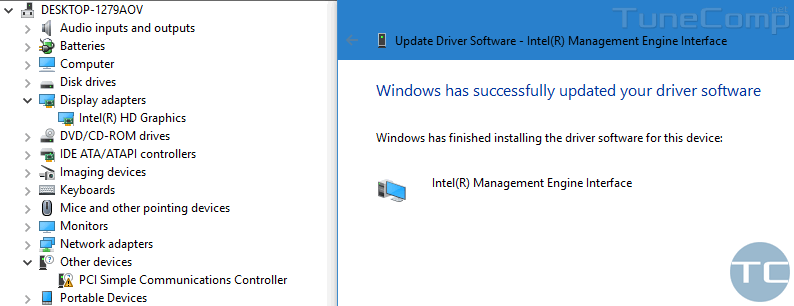
Many of you faced the “PCI Simple Communications Controller” unknown device in “Other devices” section of the Device Manager on a laptop under Windows 10. Let us find out how to download and install its driver.
Windows 10
Windows 10 is the latest version of Microsoft OS for consumer use by far. It was released in the summer of 2015 but is continuously being updated. Every Windows 10 update brings a lot of changes.
In Windows 10 Microsoft introduced the modern Settings app that should replace the deprecated Control panel but despite the fact that 5 years have passed, Microsoft is still in the process of migrating settings from Control panel to the Settings interface. It is indeed very complicated and confusing to use both a deprecated and modern interfaces for configuring your PC. So many of users have problems with it. Every next update brings a piece of improvements that makes a lot of our guides useless. So, it is these changes that are the reason for writing all kinds of new instructions and constant updating of existing ones.
Many people hate Windows 10 for its problems and glitches and wish they could switch back to the old good and stable Windows 7. But unfortunately, you can’t buy a new PC without have to deal with the 10th version of Microsoft OS, because in most cases it is the only supported operating system for the newest hardware.
How to Move the OneDrive Folder in Windows 10
By default the OneDrive folder is located in C:\Users\Your-Name\OneDrive. Why move it? The most common reason is when your current drive (in most cases your system disk) is out of space and you want to change the location of the OneDrive folder to another disk or partition. You may also want to do it if you are re-organizing your folders to bring order to your hard disk. Using this step-by-step guide you will be able to do it easily and quickly.
Laptop Battery: Plugged In, Not Charging on Windows 10. How To Fix?

Plugged in, not charging – says Windows 10 despite the percentage is increasing. What does this mean? Sometimes the only thing that makes the battery start charging is unplugging the charger and plugging it back again. In other cases it doesn’t help and Windows 10 keeps showing you 87% available (plugged in, not charging). Let’s look how to fix it.
PIN is NOT working in safe mode on Windows 10
Windows 10 users often use Safe Mode to resolve various issues with Windows related to booting, bluescreens, malware, etc. But it happens that users encounter the following notification in Safe Mode while trying to log in to user account:
Important note fo Windows 8/8.1/10 users:
Your Windows «PASSWORD» is required! (PIN is NOT working in safe mode)
Quit Immediately if you lost or don’t know it!
In this post let us discuss what to do if you see Your Windows Password is required, you are sure you type a correct password but cannot log in to your Account in Safe Mode.
8 Ways to Fix Windows 10 PC Booting to a Black Screen

Windows 10 is booting to a black screen – I think every 5 people have already encountered such an issue at least once. The problem can manifest itself in different ways: it can be just a black screen or black screen with a mouse cursor; you can face it before login as well as after you sign in to your user account; you may face it after installing updates or spontaneously etc.
As you understand, Windows 10 can show you a black screen due to various reasons. Respectively there is no universal solution to resolve the problem and recover your system to a working state.
On this page you will find 8 solutions and some extra info that hopefully will help you to fix the issue of a Windows 10 PC booting to a black screen.
Windows10Upgrade folder – is it safe to delete it?
Windows10Upgrade folder is created by the Upgrade Assistant when you downloaded the next Windows 10 Update manually instead of waiting for it to come from Microsoft Update website. Disk Cleanup doesn’t delete this folder despite it can be a few gigabytes in size: 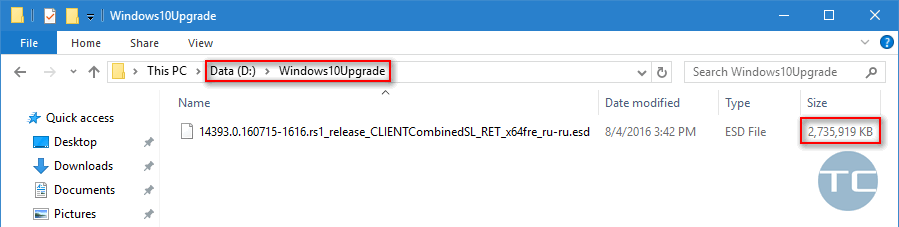
Here is how to remove the folder safely.