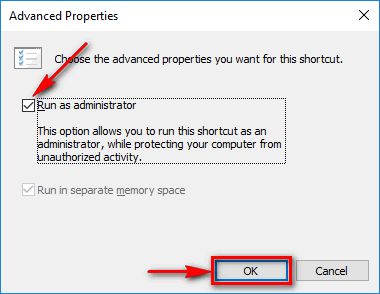
This guide is about how to permanently run a definite application as an administrator by default. So our aim is to click the shortcut of a program and make it run in elevated mode. It will be very useful if you run a program as administrator every time and do not want to perform a number of clicks for elevation each time you launch it.
Software
How to Extend the System Volume (Disk C:) on Windows 10 PC
In this guide we will explain what to do if you encounter problems with low disk space on the system partition. Before you resize volumes make sure disk C: is not filled with junk, obsolete or useless files.
How to boot into Safe Mode in Windows 10
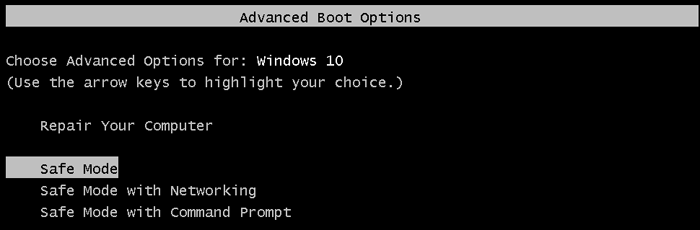
It is not so easy to boot into Safe Mode in Windows 10. First of all you need to find it in troubleshooting options. We will try to list all possible ways to enter Safe Mode. Hope you will find a suitable one.
How to Set a Wi-Fi or Ethernet Connection as Metered in Windows 10
Metered connection mode is designed for using with mobile modems, tethering or another internet connections where the traffic is limited (or is NOT unlimited). The purpose is traffic saving.
What will change in case you enable the feature? In this mode Windows won’t download updates, so you can use this option to postpone the installation of updates.
How to Sign In to Windows 10, 8.1, 7 Without Typing Your Password

If you do not want to choose the user and enter the password every time you log in to your account you may set up the automatic logon. In this case the PC would boot and log in to the specified user account without the password request. But at the same time you do not need to remove passwords from any account.
How to remove Tencent (QQ PC Manager, QQ Phone Manager, etc)

Tencent is an intrusive unwanted program. The publisher is Tencent Technology (Shenzhen) Company Limited. The program comes in bundles and installs without user’s permission.