HijackThis is a utility developed by Trend Micro which serves for malware detection and removal. Its number one purpose is to detect and remove browser-hijackers (intrusive self-launching web pages and pseudo search engines) from Chrome, Firefox, IE and other web browsers.
Download
Download Trend Micro HijackThis from the official website:
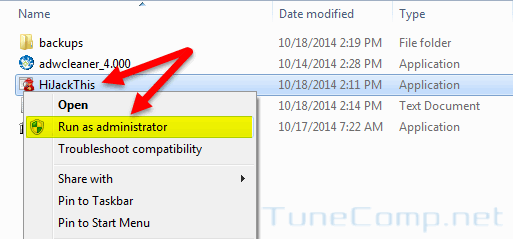
Step 1. Open the folder containing the downloaded file and launch it as administrator:
Step 2. Press I accept
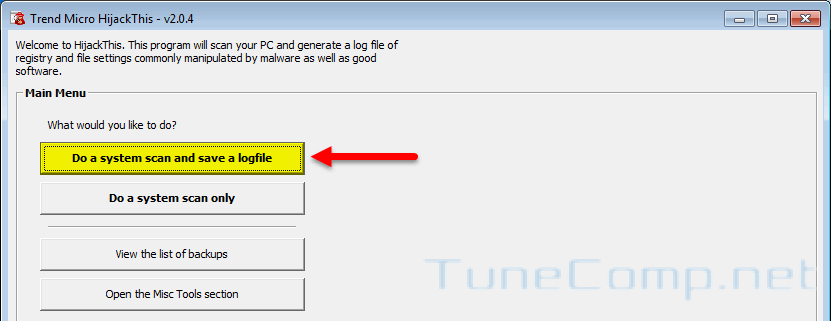
Step 3. Press Do a system scan and save a log file:
and wait until the scanning is finished.
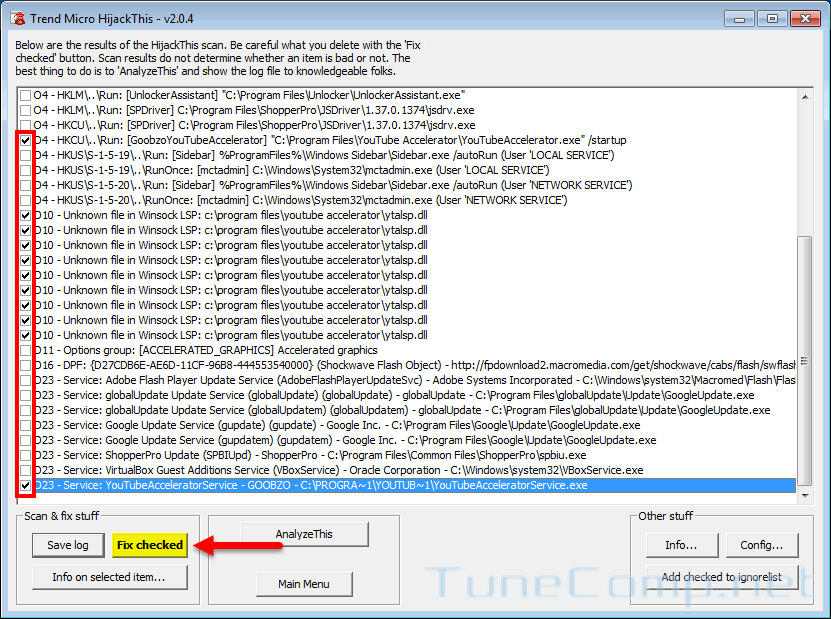
Step 4. Check all items you wish to fix and press Fix checked:
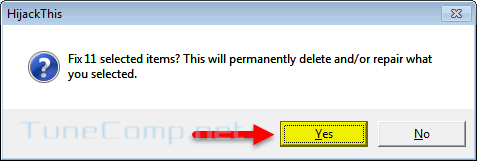
Press Yes:
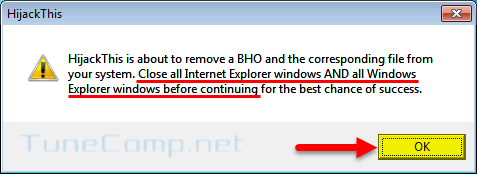
Press OK:
Now you are done!
Adam Swift
Adam is a real tech maniac. He likes to spend time testing phones, tablets, laptops, as well as any other technical devices, and write practical manuals on their functions. He often sleeps all day, but always works at night. Adam bought his first computer in 1999, being an absolute beginner who never held a computer mouse in his hands. He began to study Windows, constantly experimented and often crashed the operating system. But six months later, he was able to reinstall Windows 98 from a scratch on his own, fix almost any software problem on a PC, he also did hardware upgrades and realized that computers, operating systems and programs are now his biggest passion. In addition, Adam has always been a big lover of phones. With the advent of smartphones with Android OS, he began to pick at them much more than in computers. Now Adam loves to study privacy issues in instant messengers, blocking unwanted calls and other nuances related to privacy and security on the network. You can follow him on Twitter: https://twitter.com/tunecomp