Contents
The easiest way to remove harmful or unwanted extensions, applications and add-ons from Internet Explorer, Chrome, Opera, Firefox and other browsers.
This is a very useful way to get rid of intrusive adware extensions which are a common problem in our days.
Download the CCleaner utility from the official website: ccleaner.com
The download process should start automatically.
Launch the downloaded file:
Install CCleaner (there is no bundled soft in its installer):
Run the program.
The above utility is a handy tool to inspect all installed browsers for unwanted extensions and remove them.
In case if your PC is (or was) infected by adware, you can easily clean up the traces of unwanted software.
And browser add-ons and extensions are often the most harmful and therefore the most unwanted adware traces.
Follow the steps.
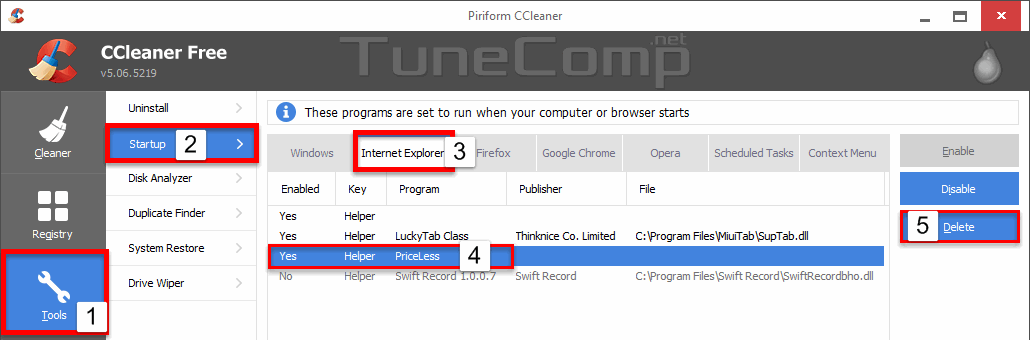
1. Go to Tools
2. Click on Startup.
3. Select the browser.
4. Select the unwanted add-on or extension.
5. Press Delete:
Most likely, you will need to remove the extension from all browsers. In this case repeat from step 3 for every browser including Internet Explorer, Google Chrome, Mozilla Firefox and Opera.
This website uses cookies.
Read More

View Comments
still cannot disable google,amazon, ebay, wikipedia in ccleaner firefox extensions. this sucks as i believe that all these extensions are based around tracking people