Contents
You may want to forget a specific Wi-Fi network if you do not want your Android device to not only automatically connect to it but to delete saved credentials as well.
Removing such information as Wireless Security Key and security mode (WPA3, WPA2, WPA, WEP) will prevent your device from ever connecting to this hotspot unless you know the password and manually type it again.
It can also help in troubleshooting some problems related to wireless networking – for instance, Saved, Secured issue.
Pull down the notification shade.
Then, tap & hold the Wi-Fi tile to go directly to Wi-Fi settings.
Tap on your active Wi-Fi network and then tap “Forget”.
In such a way you can forget only your active hotspot.
Keep reading.
Here you have three options.
Forget any hotspot that is currently in range, not necessarily the active one. Hold down on any network that it detected by your phone and select “Forget”.
Forget any network you have previously connected to.
Being in the Wi-Fi settings, scroll down and dive into the “Saved networks” section.
Here you can tap any of the listed and opt to “Forget” it.
Note, this will reset all settings related to Wi-Fi (including all saved network profiles), mobile data & Bluetooth. But if you have no other choice, you may resort to this option to forget all your wireless network profiles at once.
Go to “Settings” > “System” > “Advanced” > “Reset options” > “Reset Wi-Fi, Mobile & Bluetooth”, tap “Reset settings”, confirm your pattern or pin and then confirm by tapping Reset settings once again.
Once you’ve done this, you will need to re-configure everything related to networking and Internet.
Option #4 to delete all network profiles at once is actually the factory reset. But I think, it is quite obvious to suggest it.
Go to “Settings” > “Connections” > “Wi-Fi” or simply hold down the Wi-Fi toggle in the quick settings panel.
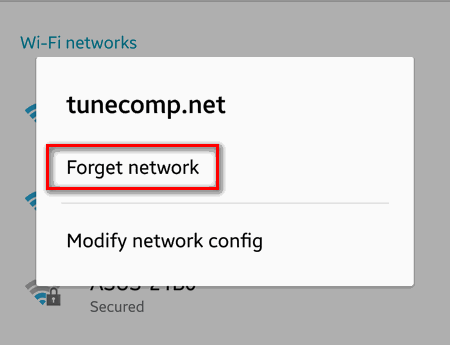
Long press the network name:
Once you’ve done this, your device will stop saying “Saved” under the name of this particular hotspot.
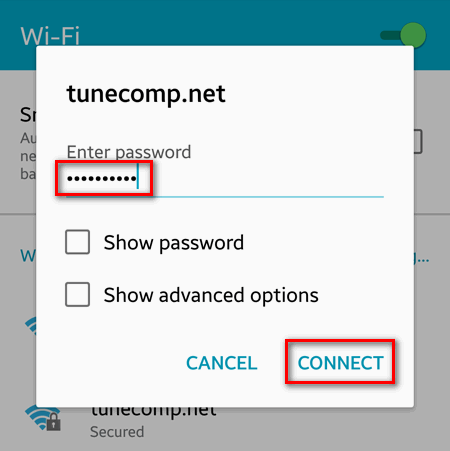
If you need to re-connect, do the following:
Tap the hotspot name in the list:
Share this guide to your friends who are Android beginners for them to master basics.
This website uses cookies.
Read More