When you install an app on your Android device it is automatically added to My Apps list. This can be useful when you buy a new Android device, log in to your Google account and want to reinstall everything you had on your previous device.
But after a while there is a lot of stuff in the list and most of it you don’t use or even don’t remember. That is why you may want to make this list a bit shorter.
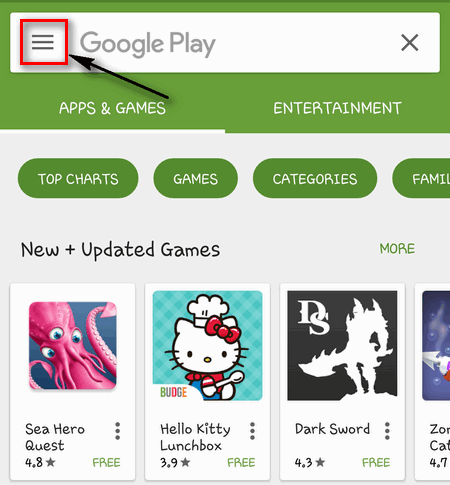
Launch Google Play Store:
Tap on the Menu icon in the upper left corner of the screen:
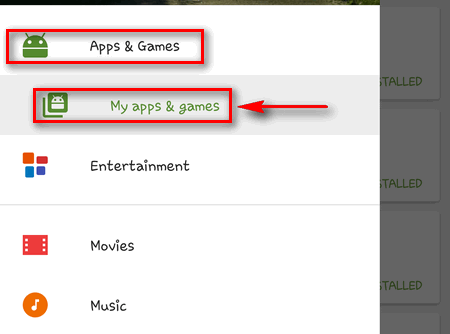
Go to Apps & Games → My apps & games:
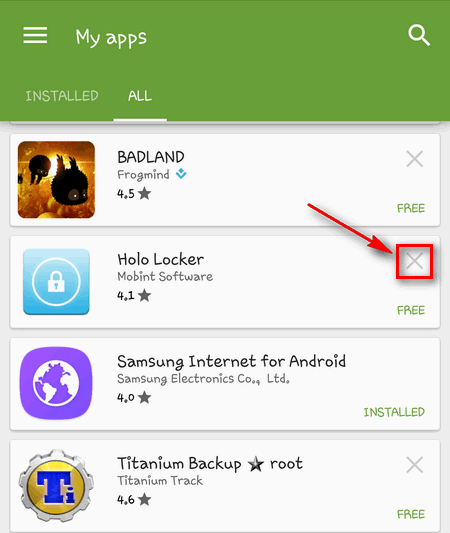
Find the one you want to remove and tap on X:
Then you will see the dialogue window Remove “the name” from my apps? Tap on OK:
Do the same to all others you want to remove.
Adam Swift Adam is a real tech maniac. He likes to spend time testing phones, tablets, laptops, as well as any other technical devices, and write practical manuals on their functions. He often sleeps all day, but always works at night. Adam bought his first computer in 1999, being an absolute beginner who never held a computer mouse in his hands. He began to study Windows, constantly experimented and often crashed the operating system. But six months later, he was able to reinstall Windows 98 from a scratch on his own, fix almost any software problem on a PC, he also did hardware upgrades and realized that computers, operating systems and programs are now his biggest passion. In addition, Adam has always been a big lover of phones. With the advent of smartphones with Android OS, he began to pick at them much more than in computers. Now Adam loves to study privacy issues in instant messengers, blocking unwanted calls and other nuances related to privacy and security on the network. You can follow him on Twitter: https://twitter.com/tunecomp


View Comments
I do not have a X to tap at all. Hence, can't remove them from the list..
1. Launch Google Play Store
2. Click the Hamburger Menu
3. tap "My apps & games"
4. tap the library tab
5. tap the "X" for the unwanted apps
6. tap [OK] on the Remove verification box
Can this be done from the web browser as well or just from inside the play app?