Echo request (a.k.a. ICMP packets or ping) serves to discover whether or not the network device is present on the network (LAN or WAN). It can be used to ping computers, laptops, servers (including website hosting ones), network printers, routers, etc. However, the ping response should be enabled in advance for the network device to be able to reply. Otherwise, you will get Request timed out instead of response.
Unfortunately the majority of users go and disable Windows Firewall when they want to allow ICMP response to have Ping command working. They forget about the fact that the Firewall protects their PC from hack and malware and it is a must when working in public networks. Here is how to do the right way.
How to Allow Incoming Ping (Echo Request) Without Disabling Windows Firewall in Windows 10
- Press Win+R.
- Type wf.msc.
- Hit Enter:
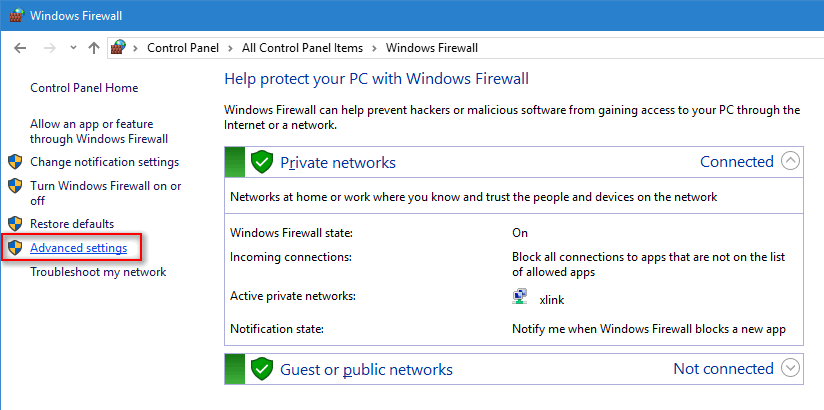
- Click on the Advanced settings link in the left part of the window:
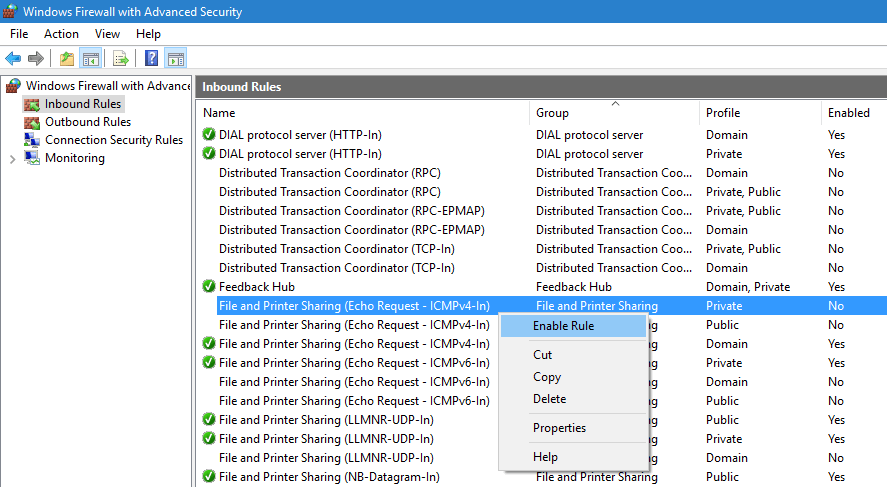
- Select Inbound Rules in the left pane.
- Enable the rule named: File and printer sharing
Note, that you can allow pings for Private, Public and Domain types of network independently. If you have separate rules preinstalled for each type, enable those you need. Otherwise you can double-click the rule to call its properties, go to the “Advanced” tab and specify network profiles:
Now your PC will respond to ICMP packets when pinged from another device. Just like this:
Hope, this will be helpful to you.
Adam Swift Adam is a real tech maniac. He likes to spend time testing phones, tablets, laptops, as well as any other technical devices, and write practical manuals on their functions. He often sleeps all day, but always works at night. Adam bought his first computer in 1999, being an absolute beginner who never held a computer mouse in his hands. He began to study Windows, constantly experimented and often crashed the operating system. But six months later, he was able to reinstall Windows 98 from a scratch on his own, fix almost any software problem on a PC, he also did hardware upgrades and realized that computers, operating systems and programs are now his biggest passion. In addition, Adam has always been a big lover of phones. With the advent of smartphones with Android OS, he began to pick at them much more than in computers. Now Adam loves to study privacy issues in instant messengers, blocking unwanted calls and other nuances related to privacy and security on the network. You can follow him on Twitter: https://twitter.com/tunecomp