Viber

How to Stop Viber on Android to Go Offline

The question: How can I completely exit and stop Viber without uninstalling the app? Even after I tapped Exit it continues to run in the background and I still receive incoming calls and messages.

The problem: Viber does not go offline

Once you signed in to Viber it stays connected to the server all the time. Even if you press Exit it would be running in a background. Viber support does not deny this behavior. It says the app is running in a background just to take care that you never miss a call or important message.

1. The user is being deceived. You can be confident that you are offline, but in fact your device can start ringing or vibrating at any inconvenient moment if somebody decides to contact you. It is very annoying.

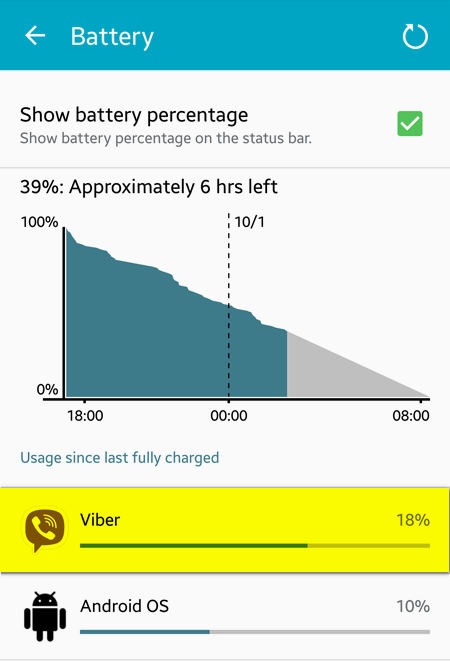
2. The battery gets empty much faster because of Viber. Just look at the image below: we did not use the app – it was just running in a background and it took 11% of battery:

Forcibly Stop the App on a Galaxy Device

1. Go to Apps > Settings > More > Application Manager > Downloaded > Viber:

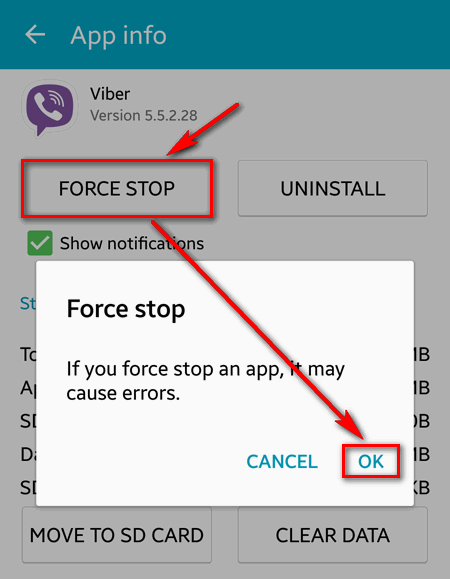
2. Press the FORCE STOP button and then tap OK:

Remark: you will have to force stop the app every time after you use Viber.

Radical methods to go offline in Viber

1. Clear app data

In App info press CLEAR DATA button:

In this case the information about your account will be erased and you won’t be online any more.

2. Deactivate your account

Launch the app.
Go to Menu > Settings > Privacy.
Tap Deactivate and confirm by pressing the correspondent button:

3. Uninstall Viber application

Please, share this guide if you consider it helpful! Also, feel free to tell us why you want to go offline in messengers.

Adam Swift

Adam is a real tech maniac. He likes to spend time testing phones, tablets, laptops, as well as any other technical devices, and write practical manuals on their functions. He often sleeps all day, but always works at night. Adam bought his first computer in 1999, being an absolute beginner who never held a computer mouse in his hands. He began to study Windows, constantly experimented and often crashed the operating system. But six months later, he was able to reinstall Windows 98 from a scratch on his own, fix almost any software problem on a PC, he also did hardware upgrades and realized that computers, operating systems and programs are now his biggest passion. In addition, Adam has always been a big lover of phones. With the advent of smartphones with Android OS, he began to pick at them much more than in computers. Now Adam loves to study privacy issues in instant messengers, blocking unwanted calls and other nuances related to privacy and security on the network. You can follow him on Twitter: https://twitter.com/tunecomp

Published by
Adam Swift

This website uses cookies.

Read More