“System and compressed memory 100% disk usage! Is this normal?” – often ask users on IT forums. Today we are going to discuss the issue and mention all possible solutions on how to stop System and compressed memory cause high disk and CPU usage in Windows 10. Please, note that there is no universal solution or fix. Different solution can work in your case. So you should try each one to fix the issue.
What is ‘System and compressed memory’
System and compressed memory is a system process designed to reduce queries. You can see PID = 4 near it in the Task Manager. It is not a virus. In this guide about what to do if the process System and compressed memory cause high disk and CPU usage.
System and compressed memory causes high disk and CPU usage. How to fix?
Here we will list all possible reasons that can cause the issue and all solutions that we know.
1. Hardware problem
Quite often it turns out that RAM or disk damage can be the reason of high disk usage produced by System and compressed memory process. We advise you to:
- Take out all your RAM modules and clean the contact pads with alcohol.
- Check the integrity of SATA cables and replace them if damaged.
- Check your RAM for errors and compatibility using Memtest utility.
- Run HDAT2 test for your hard drives to check for Bad-sectors. You can try to repair bad sectors but it would be better if you replace failing HDD.
2. Drivers: update or rollback
Do not rely on drivers that Windows 10 installs by itself from the update center. Visit the official website of your PC’s manufacturer (or your hardware component’s vendor), download the latest drivers for the current OS and install them. Pay special attention to Intel Management, Intel Rapid Storage Technology, ACPI and UEFI drivers.
3. Swap File
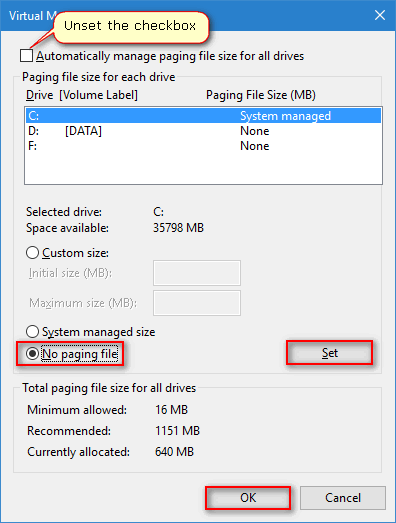
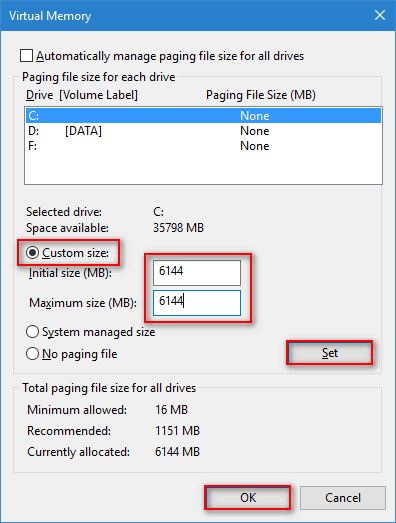
In some cases these actions can help to stop System and compressed memory cause high disk and CPU usage.
- First try to disable the swap file and reboot:
- If no effect assign a static size for the swap file and reboot:
4. Firewall and Antivirus
- Ensure you have only one Antivirus program install (do not take into account the embedded Defender. It is turned off automatically as the third-party protection is installed).
- Make sure you Antivitus supports Windows 10. Update it to the latest version.
- Try to disable the firewall component in your Antivirus.
- Try another antivirus.
5. Google Chrome
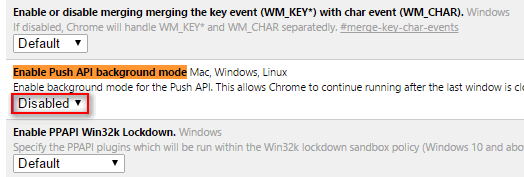
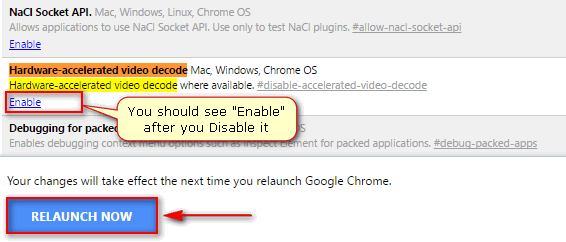
Sometimes it happens that System and compressed memory cause high disk and CPU usage in Windows 10 because of Google Chrome. Go to chrome://flags and try these two tweaks:
- Turn off Enable Push API background mode:
- Disable Hardware-accelerated video decode and click RELAUNCH NOW:
6. Crashplan
Very rare case but… Several users report that Crashplan service activity make System and compressed memory cause high disk usage in Windows 10. The solution is to turn off Crashplan background service. You will be able to switch it back to manual and start it when you need to create a backup. Not trying to say the program is bad, but check it.
Adam Swift Adam is a real tech maniac. He likes to spend time testing phones, tablets, laptops, as well as any other technical devices, and write practical manuals on their functions. He often sleeps all day, but always works at night. Adam bought his first computer in 1999, being an absolute beginner who never held a computer mouse in his hands. He began to study Windows, constantly experimented and often crashed the operating system. But six months later, he was able to reinstall Windows 98 from a scratch on his own, fix almost any software problem on a PC, he also did hardware upgrades and realized that computers, operating systems and programs are now his biggest passion. In addition, Adam has always been a big lover of phones. With the advent of smartphones with Android OS, he began to pick at them much more than in computers. Now Adam loves to study privacy issues in instant messengers, blocking unwanted calls and other nuances related to privacy and security on the network. You can follow him on Twitter: https://twitter.com/tunecomp