I don’t know about all Galaxy models, but Galaxy S-series (flagship devices) and A-series (mid-range phones) are known to support audio recording in stereo that makes your recording sound much better.
On some devices it is called Interview mode. Of course, it works only on models equipped with two hardware microphones. Here is how to switch the built-in voice recorder app to stereo mode on Samsung Galaxy devices.
Switching Voice Recorder App to Stereo Mode on Samsung Galaxy
Follow the steps:
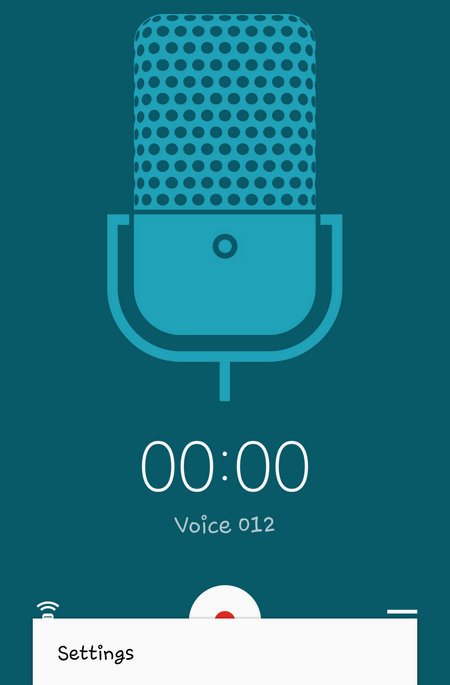
Launch the Voice Recorder app:
Open Settings:
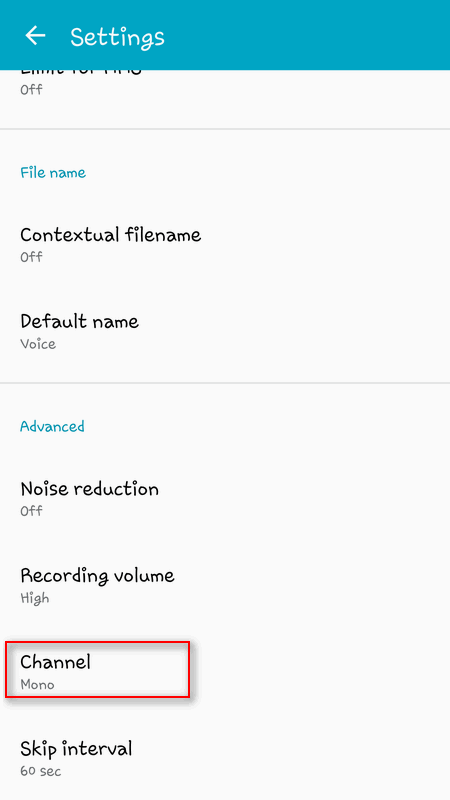
Scroll to Advanced section and tap on Channel setting:
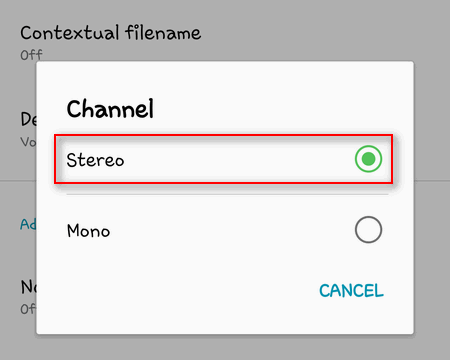
Select Stereo:
Now you can record audio in stereo instead of mono. Check the sound quality and will definitely feel the improvement!
P.S. Be noted, that audio files will grow in size if you switch to stereo recording. So, use the option when you really need it. Personally I enjoy it very much, cause I love a high quality sound.
Adam Swift Adam is a real tech maniac. He likes to spend time testing phones, tablets, laptops, as well as any other technical devices, and write practical manuals on their functions. He often sleeps all day, but always works at night. Adam bought his first computer in 1999, being an absolute beginner who never held a computer mouse in his hands. He began to study Windows, constantly experimented and often crashed the operating system. But six months later, he was able to reinstall Windows 98 from a scratch on his own, fix almost any software problem on a PC, he also did hardware upgrades and realized that computers, operating systems and programs are now his biggest passion. In addition, Adam has always been a big lover of phones. With the advent of smartphones with Android OS, he began to pick at them much more than in computers. Now Adam loves to study privacy issues in instant messengers, blocking unwanted calls and other nuances related to privacy and security on the network. You can follow him on Twitter: https://twitter.com/tunecomp